library(webrarian)

# An empty R console
collection_mirror("webr-mirror")

# Packages visitors may install, with their dependencies
collection_mirror(
  "webr-mirror",
  packages = c("dplyr", "ggplot2", "specialpackage"),
  repos = "https://myorg.r-universe.dev"
)

# Every package of repo.r-wasm.org and of `repos`: tens of gigabytes
collection_mirror("/srv/webr-mirror", mode = "full")Some networks never reach the internet, and some teams approve packages before anyone installs them. collection_mirror() serves both. It builds an R console backed by its own package repository. Visitors can install.packages() anything in that repository and nothing from outside it, because a mirror is always offline.
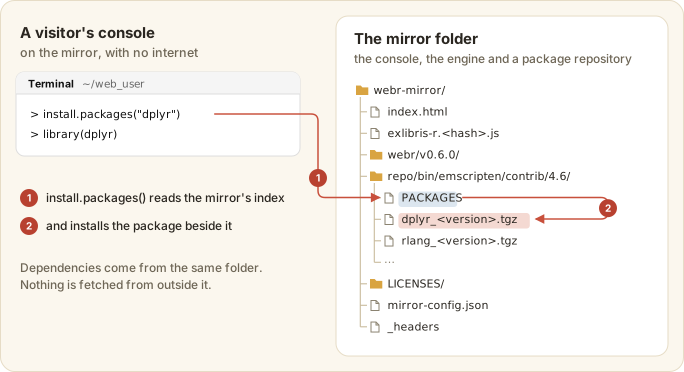
install.packages() from its own folder. The call reads the mirror’s index (1), then installs the package beside it (2).
A mirror differs from a bind() site in what goes in and in who installs the packages.
bind() |
collection_mirror() |
|
|---|---|---|
| Input | a collection with _webrarian.yml
|
a list of packages, or whole repositories |
| Your files and scripts | bundled | none |
| Packages | installed when the page opens | installed by visitors with install.packages()
|
| Requests to other servers | none with build.offline: true
|
none, ever |
| Share links |
"open" by default |
"off" by default |
Building a mirror
Start with an empty console, name the packages, or take everything.
Packages are looked up in repo.r-wasm.org, then each of repos. Downloads are checked against the repository’s checksums, and a package that cannot be obtained stops the build. mode = "full" answers the air gap and rather defeats the approval list.
Three other arguments are worth knowing. webr_version pins the engine (a tested version, or a newer patch release with a warning), favicon sets the icon, and share_links decides what share links may do (Customization).
The mirror is one directory.
webr-mirror/
├── index.html              the console page
├── exlibris-r.<hash>.js    the viewer
├── exlibris-r.<hash>.css
├── webr/v0.6.0/            the webR engine
├── repo/bin/emscripten/contrib/4.6/
│   ├── dplyr_<version>.tgz
│   └── PACKAGES, PACKAGES.gz, PACKAGES.rds
├── LICENSES/               licenses of the engine, the viewer and every package
├── sw.js                   removes any earlier service worker at this address
├── mirror-config.json      what was mirrored, and when
└── _headers                response headers for hosts that read them
To update, run the same call again. Files whose checksums match are kept and the index is rewritten. An interrupted build resumes the same way.
Serving the mirror
Serve the directory with the two cross-origin isolation headers (Deployment). Without them Ctrl+C cannot interrupt R. reading_room("webr-mirror") serves it locally with the right headers. Here is the configuration for nginx.
server {
    listen 443 ssl;
    server_name webr.internal.example.com;
    ssl_certificate     /etc/ssl/certs/internal.crt;
    ssl_certificate_key /etc/ssl/private/internal.key;
    root /srv/webr-mirror;

    add_header Cross-Origin-Opener-Policy "same-origin" always;
    add_header Cross-Origin-Embedder-Policy "require-corp" always;
    add_header Cache-Control "no-cache" always;

    location ~ ^/(webr/|exlibris-r\.) {
        add_header Cross-Origin-Opener-Policy "same-origin" always;
        add_header Cross-Origin-Embedder-Policy "require-corp" always;
        add_header Cache-Control "public, max-age=31536000, immutable" always;
    }
}
For Apache, the two isolation headers are set as follows.
<Directory /srv/webr-mirror>
    Header always set Cross-Origin-Opener-Policy "same-origin"
    Header always set Cross-Origin-Embedder-Policy "require-corp"
</Directory>
Air-gapped networks
Four steps bring a mirror into a closed network.
- Build the mirror on a machine with internet access.
- Move the directory into the closed network by your approved method.
- Serve it from an internal web server.
- Open the page and run
install.packages("dplyr")to confirm it installs from the mirror.
The page sets webR’s webr_pkg_repos option to the mirror’s repo/ only, so the console, the Packages tab and share links install from there. getOption("repos") is unchanged, so available.packages() does not see the mirror.
If an install fails, check that the package is in repo/bin/emscripten/contrib/4.6/PACKAGES, look for 404s in the browser’s developer tools, and make sure the server does not rewrite files under repo/. With a self-signed certificate, add your certificate authority to the each browser’s trust store.