
library(webrarian)

acquire_file("data/")
acquire_file("scripts/*.R")
acquire_file(c("config/*.yml", "assets/"))R in the browser cannot read the visitor’s disk, which is the browser working as intended. It sees a virtual file system instead, and that file system starts empty. bind() copies each file you include into the site, and the page copies each one into the file system when it opens.
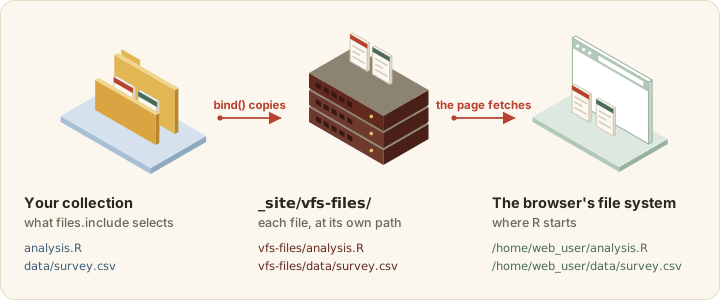
bind() copies each bundled file into vfs-files/, and the page copies it into the browser’s file system at startup.
Each file keeps its path, so data/survey.csv becomes _site/vfs-files/data/survey.csv in the site and /home/web_user/data/survey.csv in the browser. The page requests each file separately. There is no archive to unpack.
Adding files
acquire_file() adds paths, directories and glob patterns to files.include.
Each pattern must match at least one existing file inside the collection. Otherwise acquire_file() refuses it and leaves _webrarian.yml unchanged.
Pattern rules
The table shows what each pattern selects.
| Pattern | Selects |
|---|---|
data/ |
every file under data/, at any depth, except dot files |
data/* |
the files directly inside data/
|
*.R |
the .R files at the top of the collection |
**/*.csv |
the .csv files at any depth, the top level included |
*.{csv,rds} |
the .csv and .rds files at the top |
. |
every file in the collection, except dot files and dot directories |
.Rprofile |
that dot file |
.github/ |
every file under that dot directory, except dot files inside it |
Patterns are relative to the collection and select files, never bare directories.
A file or directory whose name starts with a dot is selected only by a pattern that spells the dot. The patterns ., **, data/ and *.RData all skip .Renviron, .env, .RData and anything inside a dot directory. A broad include therefore cannot pick up .Renviron or .env by accident. A pattern has to spell the dot to select them.
Leaving files out
files.exclude takes .gitignore-style patterns and removes files the include patterns selected.
# _webrarian.yml
files:
  include:
    - "data/"
  exclude:
    - "data/raw/"
    - "*.log"
A pattern without a slash (*.log) matches at any depth, a trailing slash (data/raw/) leaves out a directory, and a slash inside (data/secret.csv) anchors it at the collection root. The defaults are **/*.Rhistory and **/.DS_Store, and exclude: [] removes them.
The output directory, .webrarian/, .git/, .Rproj.user/, renv/library/, renv/staging/, node_modules/ and _webrarian.yml are never bundled, whatever the patterns. A symbolic link leading outside the collection is skipped with a warning.
Checking and removing
See what bind() will copy, or take a pattern back out.
collection_files()$files   # what bind() will copy
withdraw_file("data/temp/")
bind() also warns about any include pattern that matches nothing.
File locations
Files appear under the mount point, /home/web_user by default, and R starts there, so paths work as they do on your machine.
After a setwd(), use the full path (/home/web_user/data/survey.csv). The mount point is itself a setting.
settings_set("files.mount-point" = "/project")File size
Every visitor downloads every bundled file when the page opens. Prefer RDS to large CSV files, a sample to the full dataset, and the files the analysis reads to the files you happen to have.
Running scripts when the page opens
Three repl settings name bundled files by their path in the collection.
-
startup-scriptruns once, after the files are in place and before anything opens. It also runs for visitors arriving through a share link, and a link cannot replace it. A shared file at its path is saved beside it as<name>-shared.<ext>. -
auto-openlists files to open in the editor. Unset, the first bundled R file other than the startup script opens, andauto-open: []opens none. -
auto-runlists files to run, in order, once the console is ready.
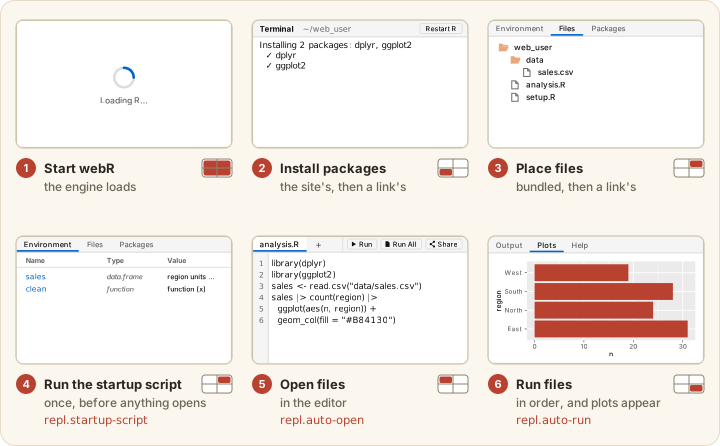
startup-script (4), opens the auto-open files (5) and runs the auto-run files (6).
A collection might set them as follows.
# _webrarian.yml
files:
  include:
    - "data/"
    - "scripts/"

repl:
  startup-script: "scripts/setup.R"
  auto-open:
    - "scripts/analysis.R"
  auto-run: []
bind() stops with an error when an entry is not a bundled file. A bare file name works when exactly one bundled file has that name. A startup script can be as short as this one.
Missing files
Work through these checks when R cannot find a file.