
webrarian builds a whole R workspace as a website. Visitors get an editor, a console, files, plots and an environment, with your packages and files ready when the page opens, and they write and run their own code against what you prepared.
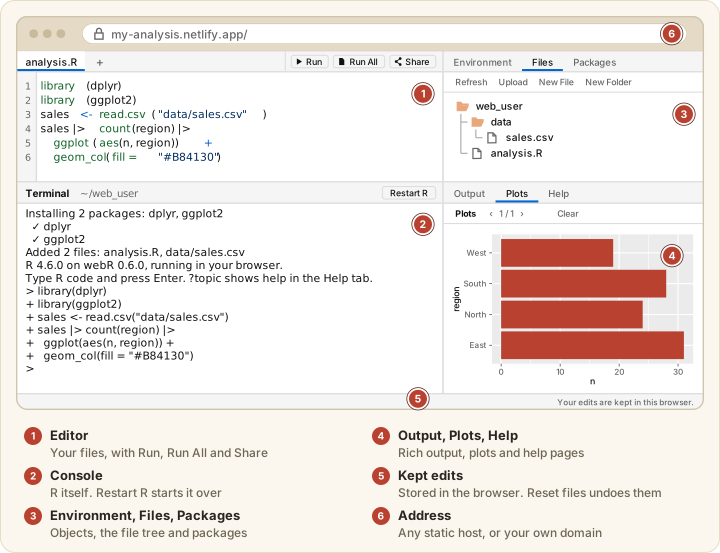
It suits four kinds of job.
- course materials where students start with the data and packages loaded
- a reproducible analysis readers can rerun and change
- a workshop sandbox with nothing to install
- an internal R console on a network without internet access
Four features set it apart.
- You build the site from R (
catalog(),acquire_package(),bind()), with no HTML or JavaScript. - Sites can be self-contained. With
build.offline: truea site makes no request to another server, andcollection_mirror()adds a package repository visitors can install from on closed networks. - It compiles your local or GitHub packages (with Docker), or uses an r-universe that has built them.
- It sets up GitHub Pages and Netlify deployment, brands sites with brand.yml, and supports share links.
pyodidarian, the Python counterpart, is released separately.
Other tools
No tool does everything, and webrarian is the wrong one for a Shiny app. The table shows what each was built for.
| webrarian | shinylive | quarto-live | webR REPL | JupyterLite | |
|---|---|---|---|---|---|
| Built for | a workspace site around your packages and files | Shiny apps | runnable cells in a Quarto document | an R console to use now | notebooks |
| How you make it | R functions and _webrarian.yml
|
shinylive::export() |
a Quarto format | nothing to build | a JupyterLite build |
| Languages | R | R and Python | R and Python | R | Python, and R through xeus-r |
Here is each in a sentence.
- shinylive runs Shiny apps in the browser, which the webrarian workspace does not.
- quarto-live makes code blocks in a Quarto document runnable, for tutorials where the prose leads.
- The webR REPL is webR’s own console, ready with nothing to build. webrarian adds your packages and files to a site you host.
- JupyterLite runs notebooks, and R runs there through xeus-r with packages from emscripten-forge rather than repo.r-wasm.org.
They combine well. A Quarto course can use quarto-live for lessons and link to a webrarian workspace for assignments.