
library(webrarian)

acquire_package("dplyr")
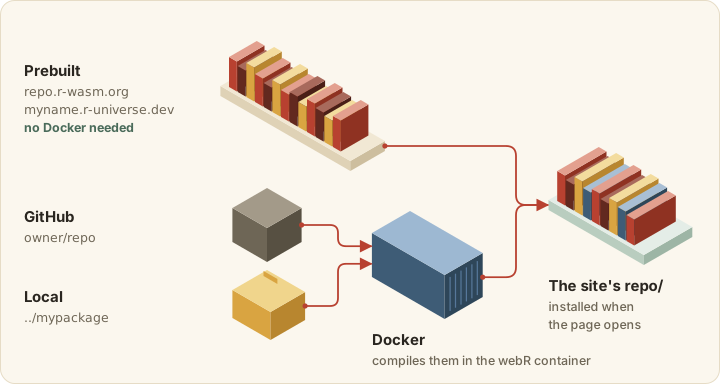
acquire_package(c("ggplot2", "tidyr", "purrr"))A collection’s packages are installed when the page opens, so visitors can call library() straight away. A browser cannot run a package compiled for your laptop, only one compiled to WebAssembly, and webrarian gets those from three sources.
Prebuilt packages
Most CRAN packages have a WebAssembly build at repo.r-wasm.org. Adding one takes only its name.
acquire_package() adds the names to packages.prebuilt. It looks them up in repo.r-wasm.org and your packages.repos, and warns about any name no repository has, which usually means a typo or a package with no WebAssembly build. The package is added either way, and without a network connection the check is skipped.
Packages that need system libraries webR lacks have no build, so check before you count on one.
check_inventory(c("dplyr", "ggplot2", "rJava"))check_inventory() returns one row per package with available, version, repository and note, then cran_version, local_version and drift (see below). With no packages it checks the collection’s list. When no repository answers, available is NA with a warning.
Other repositories
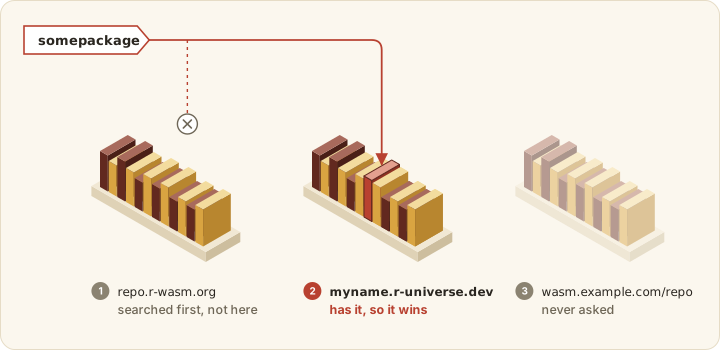
Any r-universe builds WebAssembly binaries, so it works as an extra repository.
# _webrarian.yml
packages:
  prebuilt:
    - dplyr
    - somepackage
  repos:
    - "https://myname.r-universe.dev"
    - "https://wasm.example.com/repo"
The search starts at repo.r-wasm.org and goes through packages.repos in order. The first repository with the package provides it, so order packages.repos by preference.
Dependencies
packages.dependencies: true (the default) bundles each package’s dependencies too, leaving out, with a warning, any that no repository has. false bundles only the packages you list.
Checking bundled versions against CRAN
The WebAssembly repository sometimes lags CRAN by a release.
check_inventory(c("dplyr", "rlang"))
#>   package available version ... cran_version local_version  drift
bind() makes the same comparison for every bundled package, writes the versions to packages.json in the site, and prints one line naming the packages behind CRAN. CRAN’s index is read from getOption("repos") at most once a day and cached. Set options(webrarian.cran_repo = FALSE) to skip the comparison.
Runtime repositories
A site bundles its packages by default (Site size). The page installs from these repositories, in order.
| Site | Where the page installs packages from |
|---|---|
| With bundled packages | the site’s own repo/, then repo.r-wasm.org, then packages.repos
|
| Without bundled packages | repo.r-wasm.org, then packages.repos
|
build.offline: true, with bundled packages |
the site’s own repo/
|
build.offline: true, without bundled packages |
none |
The same list serves the site’s packages at startup, install.packages() in the console (webR’s webr_pkg_repos option), the Packages tab and share links. With build.offline: false (the default) visitors can install any package those repositories hold. With build.offline: true the page never contacts another server, and asking for a package the site lacks ends with a ✗ and a reason in the console.
Local and GitHub packages are always bundled in repo/, even with build.bundle-engine: false.
Faster page loads: the package library image
A site that bundles packages in repo/ also ships them installed, as one file, library/library-<hash>.tgz. The page mounts it instead of installing each package on every visit. For dplyr, ggplot2 and their dependencies, that is one file instead of 24 installs. If the image cannot be mounted, the page installs from repo/. A site ships no image when a bundled package depends on one it does not bundle (for example with build.bundle-engine: false).
Two things need care.
- Serve the image as is. A host that adds
Content-Encoding: gzipto.tgzfiles makes webR fail with “Cannot read properties of undefined (reading ‘length’)”, and the page falls back torepo/. - The image holds every package in one file, which can exceed a host’s per-file limit (25 MiB on Cloudflare Pages).
bind()warns above 25 MiB.
One setting leaves the image out.
# _webrarian.yml
build:
  library-image: false
GitHub packages
Name the repository and say that it lives on GitHub.
acquire_package("user/repo", source = "github")
acquire_package("r-lib/cli@v3.6.0", source = "github")
acquire_package("user/monorepo/pkgs/mypkg@v1.0", source = "github")
The name can pin a ref or point into a subdirectory. Pin one, or each build takes whatever the default branch holds that day.
| Form | Example | Builds |
|---|---|---|
owner/repo |
tidyverse/dplyr |
the default branch |
owner/repo@ref |
r-lib/cli@v3.6.0 |
a branch, tag or commit |
owner/repo/subdir@ref |
user/monorepo/pkgs/mypkg@v1.0 |
the package in pkgs/mypkg
|
Local packages
Give the path to the package’s directory.
acquire_package("../mypackage", source = "local")A relative path starts at the collection, and the directory must hold a DESCRIPTION. Local and GitHub packages are compiled with Docker on every bind(), unless you avoid Docker.
Compiling with Docker
Install Docker Desktop and start it. bind() compiles in the webR project’s image for your webR version (ghcr.io/r-wasm/webr:v0.6.0 for webR 0.6.0). The first pull is about 2 GB, so the first build is the slow one. The image is x86-64 only, so ARM machines such as Apple Silicon run it under emulation, more slowly. Then ask webrarian whether it can see Docker.
The report says whether Docker is installed and whether its daemon is running.
Without Docker
Two routes compile your packages on a machine that is not yours.
- On r-universe, add your package (or a GitHub repository) to your universe, wait for its build, then list it under
packages.prebuiltwith the universe inpackages.repos. - On GitHub Actions, the workflow from
circulate_via_github()runsbind()on a runner that has Docker, so pushing the collection compiles your packages there. r-wasm/actions can also maintain a WebAssembly repository of your packages forpackages.repos.
Managing your package list
List what a collection holds, or take a package back out.
collection_packages()   # one row per package: `package` and `source`
withdraw_package("ggplot2")
The next bind() leaves withdrawn packages out.
Shiny apps
A webrarian site cannot show a Shiny app’s interface. Installing shiny gives you its functions, not a running app. To publish a Shiny app as a static site, use shinylive.
Unavailable packages
“Could not obtain requested package” means no repository has a build for your webR version. Check the spelling (names are case-sensitive), run check_inventory(), and look for the package on an r-universe to add to packages.repos. Packages that need system libraries such as GDAL or JAGS may not compile for WebAssembly at all. When a GitHub or local package fails to compile, the compiler output above the error says why (see Troubleshooting).