webrarian builds static websites where R runs in the visitor’s browser, through webR. The page opens with an editor, an R console, a file browser and a plot panel, and your packages and files are already in place. Visitors install nothing and no server runs R, which leaves little to maintain.
install.packages("webrarian", repos =c("https://coatless-wasm.r-universe.dev", "https://cran.r-project.org"))# The preview server needs httpuvinstall.packages("httpuv")
webrarian needs R 4.4 or later. Docker is optional, needed only to compile local and GitHub packages (Managing Packages).
This creates my-analysis/ with a _webrarian.yml in it, which holds the collection’s settings. Every function that works on a collection takes a path. It defaults to the working directory, and any directory inside the collection will do, so you can work inside my-analysis/ or pass path = "my-analysis", as the code below does.
Starting from an existing project
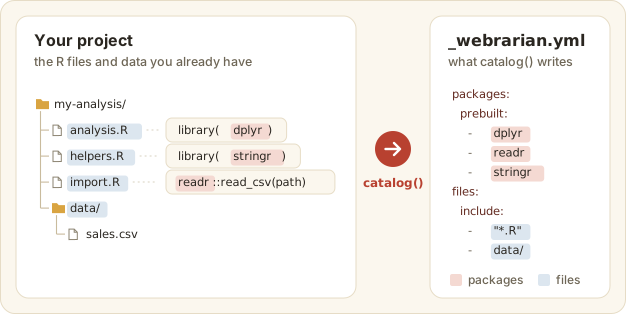
Run catalog() in a directory that already holds R files and it reads them first. The packages they load (library(), require(), pkg::fun()) and the files it finds go straight into _webrarian.yml.
Figure 2: catalog() scans your R files and fills in the packages and files it finds.
Detecting packages needs the renv package. catalog(detect = FALSE) skips the scan.
2. Add packages
Name the packages, then ask whether each has a WebAssembly build.
Both are CRAN packages, prebuilt for WebAssembly at repo.r-wasm.org. check_inventory() says whether a package has a build, which is better learned before bind() than after.
3. Add files
acquire_file() adds files that already exist inside the collection, so make some first.
data/ takes everything under data/, and scripts/*.R takes the R files directly inside scripts/. A pattern that matches nothing is an error, on the theory that you meant something. R starts in the directory that holds the files, so the script’s relative path works in the browser as it does on your machine. Bundling Files has the pattern rules.
The first build downloads the webR engine (about 38M, compressed) into webrarian’s cache, and later builds reuse it. bind() works in a staging directory and replaces _site/ only on success, so a failed build never leaves you with half a site. It also names any bundled package that trails CRAN.
This serves _site/ at a local address such as http://127.0.0.1:8123 and opens it in your browser. Press Ctrl+C (Esc in RStudio) to stop it.
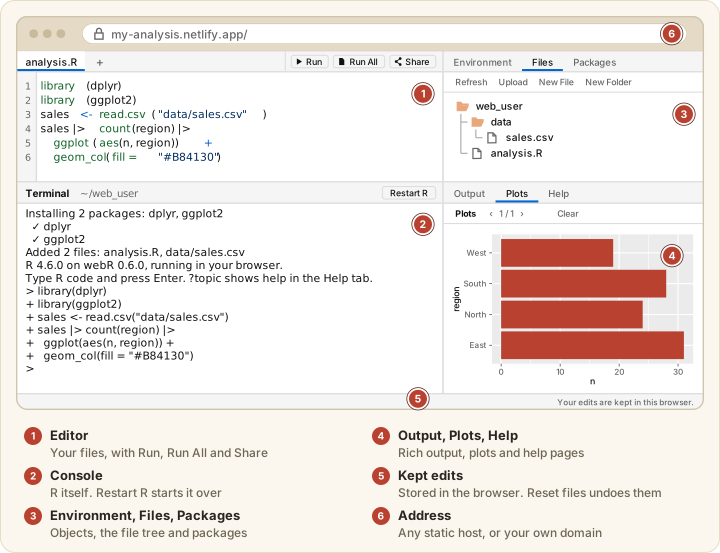
Figure 3: The site in a browser, with the editor (1), the R console (2), the Environment, Files and Packages tabs (3), the Output, Plots and Help tabs (4), the note that edits are kept (5) and the address bar (6).
The server holds your R prompt until you stop it. To keep the prompt, run the server in the background.
reading_room("my-analysis", watch = TRUE) rebuilds whenever _webrarian.yml or a bundled file changes, then reloads the open page. It blocks the prompt, so it does not combine with block = FALSE.
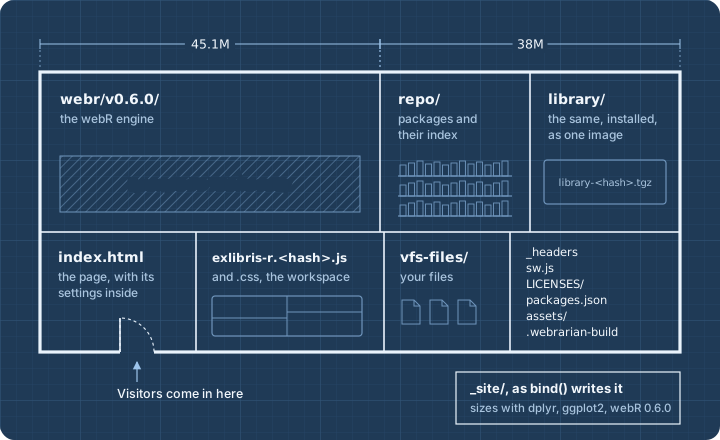
The engine and the packages take most of the room in _site/.
Figure 4: What bind() writes into _site/, drawn as a floor plan.
Here is the same directory as a listing.
_site/
├── index.html              the page, with the viewer's settings written in
├── exlibris-r.<hash>.js    the viewer, named after a hash of its contents
├── exlibris-r.<hash>.css
├── webr/v0.6.0/            the webR engine (unless build.bundle-engine is false)
├── repo/                   bundled packages and their index
├── library/                the same packages installed, as one image the page mounts
├── packages.json           the bundled packages' versions, compared with CRAN
├── vfs-files/              your files, at their own paths
├── assets/                 favicon, logo, fonts and custom CSS, when set
├── LICENSES/               licenses of everything the site redistributes
├── _headers                response headers for Netlify and Cloudflare Pages
├── sw.js                   the service worker, or one that removes it
└── .webrarian-build        marks the directory as webrarian's output
Upload the whole directory to any static host.
Site size
Two settings, build.bundle-engine and build.offline, decide how much the site carries.
build.bundle-engine: true (the default) copies the webR engine and every prebuilt package into the site.
build.bundle-engine: false leaves them out. The page loads the engine from webR’s CDN and installs packages from repo.r-wasm.org.
build.offline: true copies everything in, whatever build.bundle-engine says. The page then contacts no other server, so visitors can add only the packages the site bundles. It defaults to false.
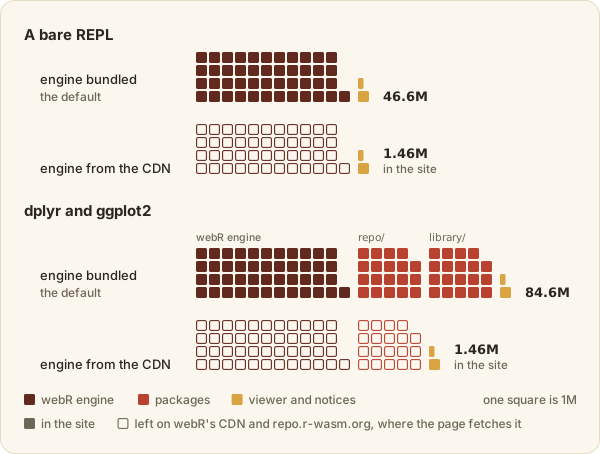
The table gives sizes measured with webR 0.6.0, as bind() reports them (1M is 1,048,576 bytes).
Site
Mode
On disk
Engine
Packages
Viewer and notices
Bare REPL
engine bundled (default)
46.6M
45.1M
0
1.5M
Bare REPL
engine from CDN
1.46M
0
0
1.46M
dplyr and ggplot2
engine bundled (default)
84.6M
45.1M
38M
1.51M
dplyr and ggplot2
engine from CDN
1.46M
0
0
1.46M
Figure 5: The same four sites, one square per megabyte. Hollow squares are fetched by the page, not held in the site.
Bundled packages are stored twice, and the table counts both copies. repo/ holds them as a repository, and library/ holds them installed, as one image the page mounts instead of installing each package on every visit (Managing Packages). Visitors download less than the site holds, because webR fetches most of R’s files only when it needs them and hosts compress responses. Repeat visits come from the browser’s cache (Deployment).