
library(webrarian)

result <- diagnose_collection()
result$ok
result$problemsStart with diagnose_collection()
diagnose_collection() asks the questions you would otherwise ask one error at a time.
It checks the network, the tools (Docker included), the settings and the packages. result$ok is FALSE when bind() would fail, and result$problems has one row per problem with its severity, area and message. Outside a collection it runs only the network and tool checks. check_inventory() and collection_files()$files are the other quick checks.
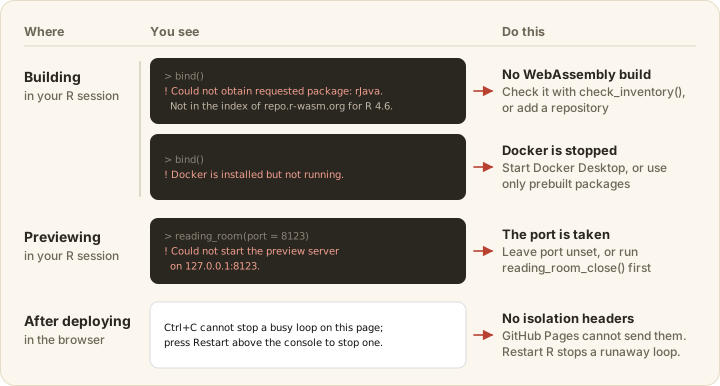
The rest of this guide is sorted by when a problem shows up. Messages are quoted as webrarian prints them, with <...> for the part that varies.
Settings
These come from reading _webrarian.yml.
Pass the collection’s path, or run catalog() to start one.
Write output-dir, not output_dir.
This one is a warning, and the build goes on without the key. Fix the spelling, or look the key up in the configuration reference.
Quote versions (version: "0.6.0"). YAML reads unquoted yes, no, on and off as true or false, which has surprised nearly everyone at least once. Only share-links: off is read back as "off".
The message lists the supported versions. Set webr.version to one, in quotes. A newer patch release is accepted with a warning.
Building
These stop bind().
No repository has a WebAssembly build. Check the spelling, run check_inventory(), and add a repository that has it to packages.repos (Managing Packages).
Install or start Docker Desktop. On Linux, add yourself to the docker group (sudo usermod -aG docker "$USER") and log in again. Or avoid Docker.
A package fails to compile
These come from compiling local and GitHub packages.
The compiler output above the message says why. Packages that need system libraries such as GDAL, HDF5 or JAGS often cannot compile for WebAssembly. Make sure the package installs in ordinary R first, because a package that fails there will not do better here.
Docker itself failed, usually while pulling the image.
Point packages.local at the directory that holds the package’s DESCRIPTION.
Files
These concern which files are bundled and where the site is written.
Compare the entry with collection_files()$files and the pattern rules. repl.startup-script, repl.auto-open and repl.auto-run must name bundled files.
bind() replaces only an output directory it made, inside the collection. Choose another build.output-dir or empty the directory yourself.
Disk space
webr_cache_info() and webr_cache_clear() inspect and clear the download cache, and clean_shelves() removes the built site. Each Docker image takes about 2 GB, and docker system prune removes unused ones.
Previewing
These come from reading_room().
Leave port unset to get a free one, or stop an earlier preview with reading_room_close().
Run install.packages("httpuv").
Run bind() first, or reading_room(watch = TRUE), which builds first.
The browser opens only in interactive sessions. Otherwise paste the address reading_room() prints (room$url with block = FALSE).
In the browser
These problems show up once the page is open.
-
A file is not found. R starts in the mount point (
/home/web_user), so relative paths work unless code calledsetwd(). The full path works from anywhere. Dot files need a pattern that names the dot. -
A package does not load. Check
collection_packages()and that the lastbind()finished. Abuild.offline: truesite installs only bundled packages. The Network tab of the developer tools (F12) shows failed downloads. -
A share link adds nothing.
repl.share-links: "fixed"takes only files,"off"ignores links, and offline sites add only bundled packages.
After deploying
Each of these traces to the host or the upload.
- Ctrl+C does nothing. The host does not send the cross-origin isolation headers, which GitHub Pages never does (see Deployment). Restart R stops a runaway loop, keeping packages and files but losing the session’s objects.
-
A curl or httr2 request ends in
Timeout was reached. The same headers are missing (HTTP requests).download.file()still reaches servers that allow requests from other sites. -
Files return 404. Upload the whole
_site/, dot files included. - The page shows an old version. Reload. With the service worker on, an open page keeps the old version until then (Caching).
Known limitations
Every site has these limits, and they are easier to read than to discover.
- Without cross-origin isolation (GitHub Pages, or a GitLab Pages instance whose administrator has not added the headers), Ctrl+C cannot interrupt R,
readline(),menu()andbrowser()do not work, and curl and httr2 cannot make HTTP requests. - Packages whose system dependencies have no WebAssembly build cannot be used.
- Shiny apps do not run in the workspace, so use shinylive.
- The Help panel shows the first match when a topic exists in several packages, and shows mathematics as plain text.
- Visitors’ edits stay in their browser (Customization), and nothing is written back to the site.
- Sites work in current Chrome, Edge, Firefox and Safari. Phones and tablets are untested.
Getting help
Open an issue at https://github.com/coatless-wasm/webrarian/issues with R.version.string, packageVersion("webrarian"), the output of diagnose_collection(), and the steps that reproduce the problem.